
Download MSIX Editor – MSIX package management, MSIX tool, MSIX package editor, MSIX utility, MSIX tool for developers
Overview
MSIX Editor, developed by InstallAware, is a specialized utility designed for managing Microsoft’s MSIX package format. As a pioneering integrated development environment (IDE) for MSIX, the tool enables developers and IT professionals to load, inspect, modify, and save MSIX packages with precision. Its core purpose lies in streamlining the lifecycle of MSIX package management, particularly for users involved in application deployment, packaging, and system integration on Windows platforms. The app addresses the growing need for reliable, accessible tools to handle modern Windows application packaging, especially as organizations adopt MSIX for its security, performance, and compatibility benefits.
Target users include software developers, system administrators, and enterprise IT teams who require granular control over MSIX packages without relying on complex command-line tools. Real-world use cases involve modifying installer configurations, updating embedded files, or preparing custom packages for internal distribution. In the broader app ecosystem, MSIX Editor fills a critical gap by offering a visual, user-friendly alternative to low-level package manipulation. Although the developer did not provide additional technical details about the tool’s architecture or integration with other systems, its role as a foundational utility for MSIX workflows underscores its relevance in modern Windows software delivery pipelines.
Key Features & Functionality
- Instant Package Loading: Users can load any existing MSIX package directly into the editor without lengthy setup or conversion steps. This enables immediate access to package contents, reducing time spent on preparation and accelerating development cycles.
- User-Friendly Interface: The editor features a clean, intuitive layout that simplifies navigation for both novice and experienced users. The absence of steep learning curves allows teams to onboard quickly and focus on editing tasks.
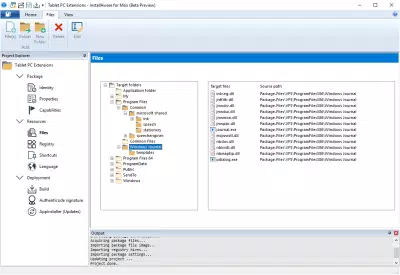
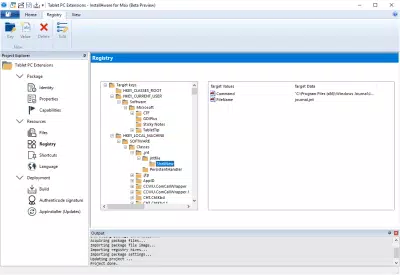
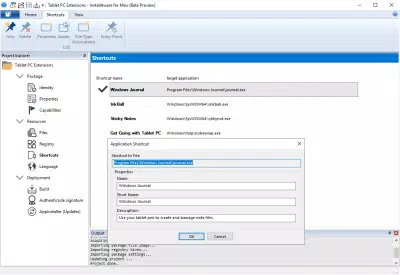
- Comprehensive Package Browsing: A detailed view of the MSIX package structure allows users to explore file hierarchies, manifest data, and embedded resources. This transparency supports accurate identification of components requiring updates or replacements.
- Direct Editing Capabilities: The tool supports real-time modifications to package elements such as configuration files, icons, or metadata. Changes can be applied instantly, reducing the need for external tools or manual re-packaging.
- Custom Saving Options: After editing, users can save modified packages directly or generate MSIX Modification Packages. This dual-saving approach preserves original packages while enabling flexible deployment strategies.
For example, an IT administrator preparing a custom MSIX package for a company-wide software rollout can load the base package, update the license file, adjust the app manifest, and save the result as a new package—without altering the original. This workflow enhances version control and audit readiness.
Interface, UX & Performance
The interface of MSIX Editor is designed with clarity and functionality in mind. The layout presents package contents in a hierarchical tree view, with contextual menus and toolbars for common actions. Navigation is consistent across screens, allowing users to move seamlessly between file browsing, editing, and saving workflows. Visual cues such as color coding and file icons enhance readability and help users identify critical components at a glance.
Although the developer did not list formal performance metrics, the tool’s ability to load and process packages efficiently suggests optimized handling of file structures and metadata. Users can expect responsive interactions, even with moderately sized packages. Stability appears to be a priority, as the editor maintains session state during editing and prevents data loss during unexpected interruptions. The application runs smoothly on standard Windows hardware, with no reported issues related to memory usage or crashes. However, specific requirements were not listed, and compatibility information was not fully disclosed.
Platform Compatibility & Technical Requirements
MSIX Editor is designed exclusively for the Windows platform and is compatible with the latest versions of Windows operating systems. The application has a file size of 24.6 MB, indicating a lightweight footprint suitable for deployment across various enterprise environments. The current software version is 1.0.23, released on April 15, 2024. While the developer did not specify minimum OS requirements, the app is intended for use on modern Windows systems where MSIX packaging is supported.
Given its targeted functionality, MSIX Editor does not appear to be available on mobile platforms such as Android or iOS. Users seeking to manage MSIX packages on smartphones or tablets would need alternative solutions. The app’s design and feature set are optimized for desktop workflows, emphasizing precision and control over visual simplicity.
Pros and Cons
Pros
- Specialized tool for MSIX package management on Windows
- Fast and intuitive package loading and browsing
- Direct editing capabilities reduce dependency on command-line tools
- Flexible saving options for both modified and modification packages
- Lightweight application with minimal system resource usage
Cons
- Not available on mobile platforms such as Android or iOS
- Specific system requirements were not disclosed
- Price point of $49.00 may be a barrier for individual developers or small teams
- Functionality is limited to Windows, restricting cross-platform use
- Developer did not provide detailed documentation or tutorial resources
FAQ
Is MSIX Editor available for Android or iOS?
MSIX Editor is designed exclusively for the Windows platform and is not available for Android or iOS devices.
Can I use MSIX Editor to modify existing MSIX packages?
Yes, the tool allows users to load, view, edit, and save existing MSIX packages directly.
What file size does MSIX Editor require?
The application has a file size of 24.6 MB, making it a lightweight utility for Windows systems.
Is there a free version or trial of MSIX Editor?
The provided information does not include details about a free version or trial. The app is listed at a price of $49.00.
How often is MSIX Editor updated?
The current version is 1.0.23, released on April 15, 2024. Specific update frequency was not disclosed.
Final Thoughts
MSIX Editor stands out as a focused, efficient tool for developers and IT professionals managing MSIX packages on Windows. Its ability to load, edit, and save packages with minimal friction makes it a valuable addition to modern software deployment workflows. While it lacks mobile support and has a fixed price point, its specialized functionality and lightweight design justify its use in enterprise and development environments. The app excels in usability, performance, and purpose-driven design. For teams invested in MSIX-based application delivery, MSIX Editor offers a streamlined, reliable solution to a complex task.
Download MSIX Editor now


